
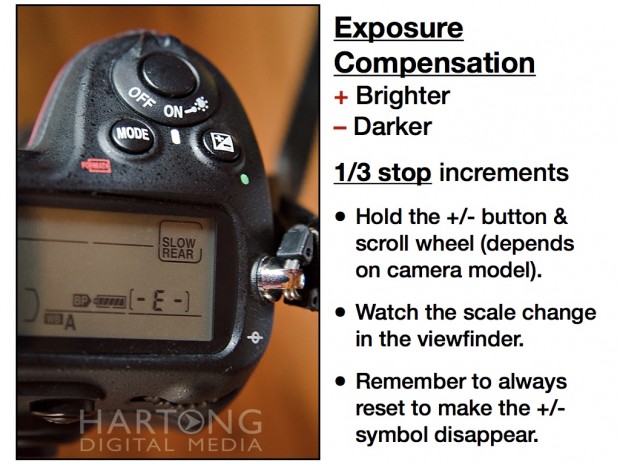
 One of the most useful buttons on your camera is the +/- button. On many Nikon cameras, find it on top on the camera near the shutter release. On many Canon cameras, look on the back near where your right thumb rests as you hold the camera. This button is used for Exposure Compensation.
You’ll even find the +/- button hiding on most point & shoot cameras!
With this button, you can take control exposure when the camera chooses to make it too bright or too dark. You “override” the camera’s meter by adding or subtracting exposure.
Plus (+) makes the image brighter overall, typically slowing the shutter speed to allow a longer exposure, therefore brighter. Minus (-) makes it darker, typically faster shutter speed. This shifts the entire histogram left (darker), or right (brighter). Typically exposure can be adjusted in 1/3 stops up or down within 3 stops of what the camera selects.
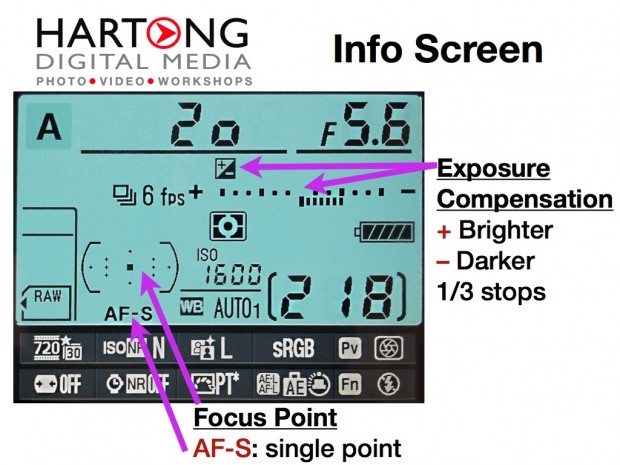
Double tap the (i) button on Nikon or hold +/- button then scroll wheel.
Step 1. Add Exposure for Backlight or Shaded Subject
For the Portrait Left, I held down the +/- button and rolled the back dial on my Nikon D300s, adding 1.3 stops of exposure to the combination the camera chose, without adding flash.
Step 2. Add Flash (and Flash Exposure Compensation)
The trick is to think of the ambient exposure as 1 piece of the puzzle, and flash as another piece, almost a separate exposure.
Portrait Right, the overall exposure is set to +0.3 or 1/3 stop overexposure. But a Nikon SB800 FLASH is used as well, set to TTL (matching the flash output to camera exposure). In addition to that, the FLASH exposure compensation is set to +1.7 stops. This makes the flash output almost 2 stops brighter than ambient exposure, but the camera set to TTL adjusts for that.
Easy to do on most Nikon cameras by holding down the button on the side that pops up the flash and rolling the front dial. OR press the (i) button twice, then scroll through the menus on the back of the camera to highlight the lightning bolt / plus minus combo.
Notice how adding flash with +1.7 stops extra creates a background that balances more accurately with the subject? This exposure method also helps compensate for color casts. Plus the whites of her shirt are not blown out as they are in the image on the left, which is honestly a bit overexposed. If I had taken another second to check my display, I would have seen that part of the image was flashing (flashing highlights) and could have backed off to +1.0 on exposure compensation in the 1st image.
FLASH More!
Tip #1: Using flash outside makes a HUGE difference! So does the +/- button. Use 1, or both together.
TIP #2: Using the small built in flash? Stay within 10-15 feet of your subject without anything between you.
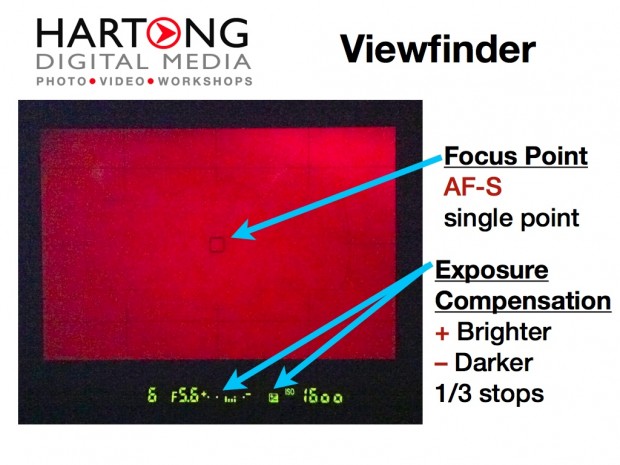
Tip #3. Look through the viewfinder and notice the scale on the bottom. Remember to reset. You should see the scale for +/- in the viewfinder as well. Remember to reset back to 0 so the +/- symbol disappears.