
Well, it happened. iPhoto has been replaced. The new app, Photos, is available with an OS X update. It’s very similar to the iPad & iPhone app – making the Mac even more like your mobile devices.
Here are some tips right out of the gate to get you started.
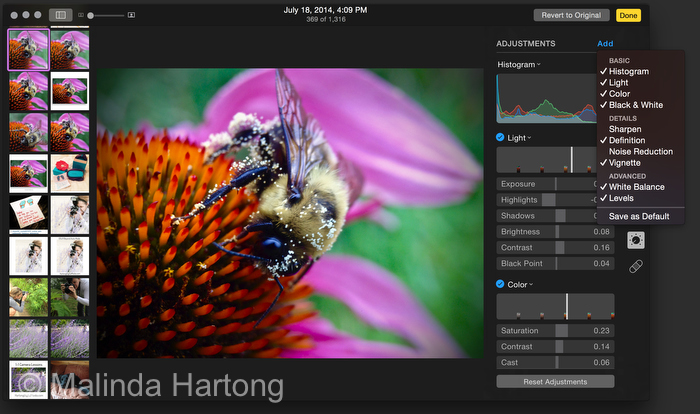
how to use the new Photos app for Mac to edit photos
Setting Up Photos for Mac
On iPad, iPhone and Mac, settings are fairly similar. You can crop, straighten, adjust Light, Color, and Black and White, and dig even deeper, seriously fine-tuning your images. You can even choose to access ALL your images! Woah!
All Images, All Devices: iCloud Photo Library
First things first – you can choose to upload ALL your images to iCloud – which makes them available to ALL your devices you’re signed into with iCloud – including your iPhone, iPod Touch, & iPad. I chose not to do this as I’ve got over 10,000 images in my library. I’d rather choose what I want to share via Photo Stream, but that’s another story for later.
Your edits sync across all your devices. That’s pretty cool. You get 5 GB free storage with upgrades available up to 1 terabyte. Holy photo library! Don’t even ask how many gig my photo library is. EEEK! 🙂
Yes, you still do get Album thumbnails, as well as Moments & Collections like your phone. The real key to finding photos is the i button – add keywords people!
You can also see the metadata – the settings used to shoot the photo. OK – enough about interface, let’s get into making your photos even more amazing! Click the Edit button – top right of the toolbar.
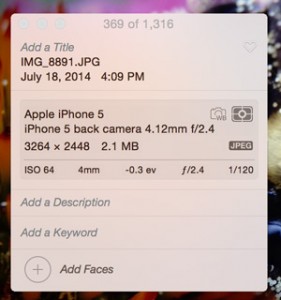
add keywords – hit the i button in the toolbar
See the little dial 5 symbols down? Click that! It’s magic! It opens Adjustments! Let’s start with Light. First – turn your screen brightness all the way up (every time you edit anything! Even on iPad or iPhone! – F2 on your keyboard) Now click the down arrow next to Light, you’ll find these key options:
- exposure – don’t adjust so much brighter that you loose detail
- highlights – make the brightest areas of the photo darker (as long as they’re not totally blown out)
- shadows – rescue detail in your shadow areas.
- brightness
- contrast
- black point – how dark the darks are
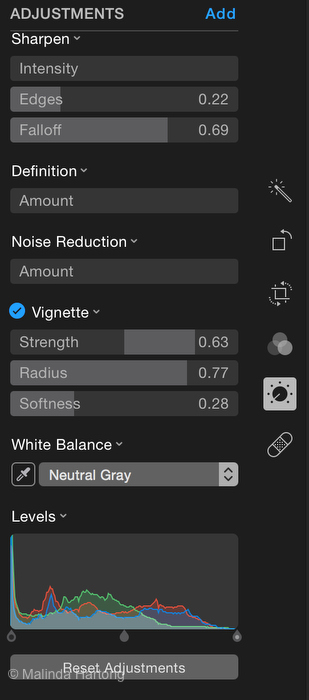
 Hidden Advanced Editing Features
But Wait – There’s MORE! See Add up by ADJUSTMENTS? Add more details and options! Make sure Histogram is on! I also turned on Vignette, White Balance and Levels.
Vignette – add a darker edge to your image, a pro editing trick that highlights your subject. This was UGLY in iPhoto. It’s MUCH BETTER in Photos! Softness really helps blend the darker edge so it’s subtle. Radius is how big the circle is – depends on the relative size of your subject.
White Balance – click on a neutral shadow tone to adjust the COLOR of your image
Levels – my FAVORITE! This one deserves a blog post all on it’s own. Stay tuned!
Also more on the bandaid – visit this page again soon! I’ll update it asap and add more tips!
Want to learn more? Check out upcoming workshops – especially Editing for iPad and if you’re interested in a Photos for Mac workshop – send me a contact email and we’ll get one on the calendar!
[button color=”#ffffff” background=”#923893″ size=”medium” src=”https://www.hartongdigitalmedia.com/shop”]Upcoming Workshops[/button]