
• Main
  • Book Me
  • Gift Certificates
    • Order now
  • Private Lessons
  • Photo Editing
  • Phone Workshops
  • Contact Malinda
    • About Malinda
    • Photo Gear
  • Let's Connect! Hit the text button or call 513-245-4100.

  • Private Lessons

  • 1 to 1, friends, or custom groups, lessons are designed for your personal experience and gear. Our favorite spots are Winton Woods or our nearby Studio, Glenwood Gardens, & the village square in Glendale. Or add travel for a small fee. Learn your camera iPhone to SLR, beginner to Pro levels, Studio, Lighting, Photoshop CC, Lightroom CC, Keynote, Mac Photos, social media speed tips... Schedule Appointment

  • Gift

    Gift Certificates – perfect for any age or experience level for classes or lessons
    Gift Certificates

By Appointment 513-245-4100
  • Book Now
  • Photography Lessons
  • Photo Editing
  • Contact
  • Gift Certificates

Hartong Digital Media llc
  • Main
  • Book Me
  • Gift Certificates
    • Order now
  • Private Lessons
  • Photo Editing
  • Phone Workshops
  • Contact Malinda
    • About Malinda
    • Photo Gear

PHOTOS on the GO

Smart Phone Photo Workshop
July 9 7–9 p.m.
Glenwood Gardens
$45 with e-book filled with photo tips & editing tricks
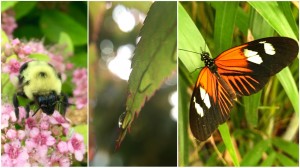
iphonography-hartong1Bring your smart phone (iPhone, iPad, iPod, Samsung, Android) – learn tips and tricks to get great images, favorite universal apps for easy and amazing photo editing, how to import photos from computer or camera, and cool ways to share and back up photos! Program is for ages 15 and up. Glenwood Gardens/Gardenview Room. Keep reading for some really cool tips to keep in mind when shooting images with your phone.

[button color=”#ffffff” background=”#750291″ size=”large” src=”http://bit.ly/1TIE601″]REGISTER by 7/8[/button]

Photos on the Go Smart Phone Photography Workshops are being scheduled at several Great Parks of Hamilton County Parks led by Freelance Photojournalist & Photo Instructor Malinda Hartong, Hartong Digital Media llc. These images were captured with an iPhone6 using Camera+ in macro mode, with exposure compensation. Various apps and lenses allow you to capture amazing closeup shots, depending on which phone you're using - Samsung Galaxy, iPhone and more.  © Malinda Hartong, Hartong Digital Media llc. Photos on the Go Smart Phone Photography Workshops are being scheduled at several Great Parks of Hamilton County Parks led by Freelance Photojournalist & Photo Instructor Malinda Hartong, Hartong Digital Media llc. These images were captured with an iPhone6 using Camera+ in macro mode, with exposure compensation. Various apps and lenses allow you to capture amazing closeup shots, depending on which phone you're using - Samsung Galaxy, iPhone and more.  © Malinda Hartong, Hartong Digital Media llc.

Shot with iPhone6

Your smart phone is the only camera you carry all the time.

I carry my phone with me everywhere. Often I’ll see cool things, and be able to make a picture. We apply many of the same tips of dslr photography to smart phone photography.
I’ll be sharing quite a few really cool tips & tricks in my Photos on the Go Workshops. But in case you’re unable to join me there for a hands-on experience, here are a few quick tips to keep in mind.

5 tips: Getting Great Photos on the Go

  1. GET CLOSE! Our phones typically only have a wide angle lens. Any “zooming” we do, we should do with our feet and not the zoom feature on the phone.  It’s digital – actually cropping in and NOT really optical zoom – it tends to look pixelated and is best avoided for sharper images. You can always crop later.
  2. FOCUS! With most phones, tapping the screen on your subject adjusts focus to that area of the image. It also adjusts exposure to that part of your shot too – so it’s CRITICAL to tap to get the best images!
  3. SHOOT a LOT! I tend to shoot a TON of images, especially when I’m shooting closeups. It’s easier to delete photos later, than miss the shot. If I don’t get a sharp one when I’m there, why bother?
  4. BURST MODE! Shooting in quick succession helps capture images where the subject is moving, or in low light, much better. You can also overcome blur due to slow shutter speeds by shooting continuous images instead of lifting your finger up and down – which moves the camera or phone and increases the possibility of blur.
  5. ADJUST EXPOSURE! Most phones offer a feature in their built-in camera apps to adjust the image to make it lighter or darker on purpose. We REALLY cover this in ALL my workshops as it’s CRITICAL to getting the best image possible.
Photos on the Go with @GreatParks

Photos on the Go with @GreatParks

I capture as much detail when I’m shooting, regardless of the camera. Then I edit later, and avoid using filters at the time I’m taking the shot – this gives me a TON of options later. We’ll also explore my favorite free universal photo editing app for rescuing dark shadows and really making photos pop.  Want to learn more? Join me in an upcoming Photos on the Go or Editing on the Go Workshop, or private lessons. These workshops are also available to be customized for your group or business. I’ve led them for the park district’s education and social teams to rave reviews.

Questions? Email me! I’d love to hear from you!

  • Share On Facebook
  • Tweet It


  • Topics

    Uncategorized


  • Book Malinda
  • CONNECT

    I'm Malinda Hartong, Freelance Photojournalist and I've been documenting life behind glass for several decades. Glenn Hartong, my husband (Photojournalism Instructor with 27 years news experience), and I LOVE shooting, as well as sharing our extensive knowledge with all ages, experience levels. We keep it SIMPLE!

    Click to Call Malinda +1 (513) 245-4100 We're not currently offering group classes but DO offer 1 to 1, friends, and single family lessons - in person or virtual.

    Private Lessons are available 6 days/week. Any age. Absolute Beginner to Pro. All Photography, Mac topics, from simple basics to iPhone to advanced studio lighting, studio and posing to editing. Virtual Lessons also available anywhere in the US via phone or computer - Zoom or facetime. Choose a package of 2,3, 6 or 12 lessons and save!

    Locations: Our studio is near Winton Woods. Our favorite locations for Lessons are Winton Lake, Glenwood Gardens, Glendale, and our studio - especially our client-favorite front porch and our gorgeous country setting. We're also available for travel to you, and virtual.

    If you encounter any problems here, please contact us - we do our own website - THANKS!

    Contact Us

    Best way to reach us is chat, text, or email as we're frequently in lessons or on shoots. Just click the Text button - it goes straight to Malinda's phone - we never share your info

    Check out our Photo + Video Services at TheHartongs.com including Headshots, Branding, Event coverage, professional aerial photo/video, and more.


© Malinda Hartong, Photojournalist, Hartong Digital Media llc. All Rights Reserved. Call 513-245-4100. Cincinnati Ohio 45231